
F1 Systems
  • Reviews
  • (303)464-0011
  • Sales@F1-Systems.com
  • Map
  • Contact
  • Menu Menu
  • Facebook
  • Twitter

How do I have Windows check for Updates?

July 8, 2021/in FYI, Uncategorized/by Warren

How do I have Windows check for Updates?

How do I have Windows check for Updates and why? Windows updates provide patches, fixes, and new material. The major updates each year bring design changes, improvements, and fixes to the operating system and Windows properties. Other updates are for fixes, corrections, and new material like updated drivers. There is no other update system or manager needed for Windows and for more devices used by Windows.  Most manufacturers are providing their latest driver updates through Microsoft rather than directly to the user. Gamers still rely on the manufacturers for the latest updates for their particular video card.

How do I know what version of Windwos is running?

Check what version of Windows is running.

How to have Windows check for updates

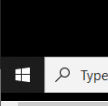
  1. Click the START button
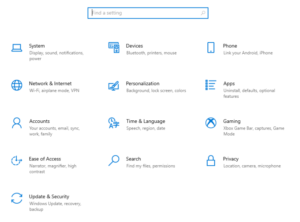
  2. Click on Settings (the Gear icon ⚙)
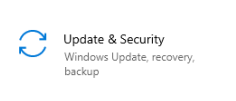
  3. Select the Update & Security icon.
  4. Under Windows Update is the Check for updates button.
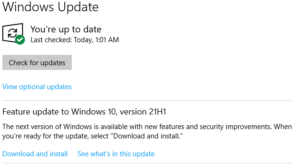
Clicking the Check for updates button tells Windows to check for any new updates. In this example Windows is up to date but there is a verserion update avaiable. Any updates listed below the Check for updates button should also be installed.

It is important to keep current on updates to protect your system and your personal data. Visit Microsoft for more information about recent Windows Updates.



bento4d

slot online

toto togel

toto togel

situs slot

toto togel

toto togel

toto togel

toto togel

toto slot

toto slot

slot online

situs togel

slot thailand

toto slot

link slot

situs slot

slot gacor

toto slot

situs togel

toto slot

rtp slot

bento4d

bento4d

toto slot

bento4d

situs toto

Tags: security, update, version, Windows
Share this entry
  • Share on Facebook
  • Share on Twitter
  • Share on Twitter
  • Share on WhatsApp
  • Share on Pinterest
  • Share on LinkedIn
  • Share on Tumblr
  • Share on Vk
  • Share on Reddit
  • Share by Mail
https://f1-systems.com/wp-content/uploads/2021/07/Earth-1200x768-1.jpeg 433 770 Warren https://f1-systems.com/wp-content/uploads/2020/08/F1-Logo500percent-300x82.png Warren2021-07-08 18:40:342025-10-29 22:37:07How do I have Windows check for Updates?
You might also like
PERSONAL IDENTIFYING INFORMATION SECURITY LAW CHANGES IN COLO
Computers in Recycle SymbolWe Recycle!

Categories

  • About us
  • Colorado
  • FYI
  • Law
  • News
  • Personal
  • Security
  • Uncategorized

For assistance or more information, contact F1 Systems

Call today:

(303) 464-0011

OR

Schedule Appointment Online
Maps were disabled by the visitor on this site. Click to open the map in a new window.
© Copyright - F1 Systems, Inc. Site Built By: Overhaulics
  • Facebook
  • Twitter
How do I check my Windows version?How can I make my mouse left handed?
Scroll to top