
Windows 11 upgrade error: “This PC doesn’t currently meet all the requirements for Windows 11”?
Your PC doesnt meet all the requirements for Windows 11
When installing Windows 11 it shows an error indicating your PC doesnt meet all the requirements for Windows 11. The exact text is:
“This PC doesn’t currently meet all the requirements for Windows 11”
Windows 11 has many new security features and these require the PC to provide support for advanced seurity, both in software and hardware. If you are installing Windows 11 new or installing it as an in-place upgrade, this is likely the most common problem fols are running into.
What’s going on?
When upgradeing to Windows 11 you may receive an error stating “This PC doesn’t currently meet all the requirements for Windows 11.” This error is in response to the PC, correctly or not, detecting that at least one of the Windows 11 requirements is not met. Here are the minimum requirements for Windows 11:
- Processor: 1Ghz dual core minimum
- 64-bit Display: 720p (1280×720 px) with a screen size of minimum 9-inch
- Graphics card: DirectX 12 compatible graphics with WDDM 2.x
- RAM: 4 GB minimum
- Storage: 64 GB minimum
- Firmware: Secure Boot enabled UEFI
- Trusted Platform Module Support: Version 2.0 or higher
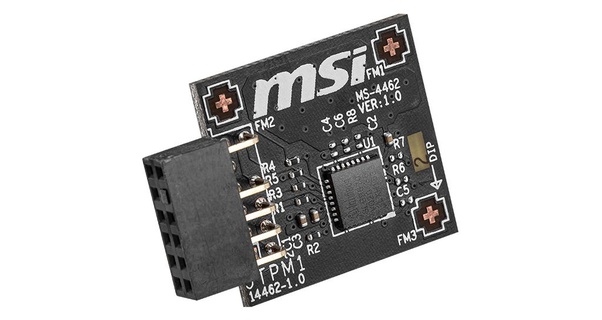
These are pretty minimal requirements for a modern laptop or PC performance wise. The thing that is new is Windows 11 now requires Trusted Platform Management (TPM) support. This means the motherboard and CMOS need to support TPM and have it enabled. Not all motherboards have the TPM chip out of the box and some offer it as an add-on module sold seperately. There is even talk of software TPM though that is for another discussion.
MSI TPM Module
Microsoft provides an app for checking if your PC is ready for Windows 11. The Microsoft PC Health Check app will show if your PC is ready for upgrade and, if any, what needs attention. Quite often, the issue is related to TPM support not being available or enabled.
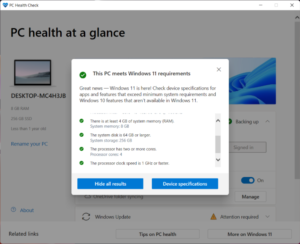
PC Health Check
What to do
If your PC meets all these requirements and your motherboard supports TPM you will need to make sure it is enabled in the BIOS.
- Boot the PC and go into the BIOS setup screen
- The BIOS screens are particular to your motherboard so may not look like the image below
- Search through the Advanced BIOS setting for the TPM options
- Set TPM to Enabled
- If available set Version to 2.x
- Save your changes (F10 usually) and reboot
- Restart the Windows 11 installation and see that the error has cleared.
- In some cases it may require you to do a clean install rather than an in-place upgrade
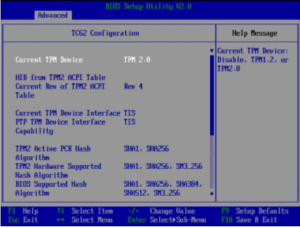
TPM BIOS Setting
Resources:
Trusted Computing Group whitepaper on TPM
Windows 11 System Requirements
